How many times have you seen a reference to a book and thought, “I’d like to look at that book, but not right now”—and then wondered how you’d find it again? Or maybe you’ve found several books that might be useful for your research project, but you haven’t decided which ones to look at first—how can you save all the maybes?
Great news! Our catalog has a feature that enables you to save catalog records (books, videos, ebooks—anything in the catalog) and tag them to make them easy to find later. It’s like a wish list in a shopping site.
How can you use this feature?
Spend a couple minutes with me and I’ll show you:

Showing posts with label library catalogs. Show all posts
Showing posts with label library catalogs. Show all posts
Tuesday, May 12, 2020


Tuesday, May 3, 2016
Library Closing Early on Friday-- Library Website Also Down
This Friday, May 6th, Gallagher Law Library is closing 1/2 hour early at 5:30 p.m. The Circulation Desk will close at 5:15.
All visitors, students, faculty, and staff, must leave the library and Gates Hall at 5:30 p.m. UW Law faculty, staff, and students, please see your email for more details.
The reason for the closure is a planned power outage to the entire building. This outage will affect the library's website (including legal research guides), the library catalog, and a few other resources. Most electronic databases will not be affected. The School of Law website will be similarly affected. Both sites should be back online on the morning of May 7th.
All visitors, students, faculty, and staff, must leave the library and Gates Hall at 5:30 p.m. UW Law faculty, staff, and students, please see your email for more details.
The reason for the closure is a planned power outage to the entire building. This outage will affect the library's website (including legal research guides), the library catalog, and a few other resources. Most electronic databases will not be affected. The School of Law website will be similarly affected. Both sites should be back online on the morning of May 7th.
Wednesday, August 21, 2013
New Catalog Tips
Have you tried the new catalog search yet?
Here are two quick tips: one for successful searching and one for individual preferences.
AND
When you type a few words into the keywords search box, the system assumes an "AND" between each word. So a search for "rodgers environmental" is interpreted as "rodgers AND environmental."
That is great, unless you need to use synonyms because you may not be sure of which word appears in a title or subject heading.
Say you are looking for material on Washington State laws concerning children. Do you use child, children, infants, or minors in the search? You can use all of those terms; just type the word OR between them.
Please, May I Have Some More?
I am frustrated by only seeing ten results after I run a search. Many other databases give me the option of asking for a greater number of results, why not the catalog?
Well, you do have the option of seeing more results, but the option isn't where most of us expect to find it, on the first page of our list of results.
Instead, click on the link to Your Library Account--you'll see this on the top right hand side of the screen. If you signed in with your UW Net ID before the search runs, you will get into the Account information automatically. (If you didn't sign in individually, you will need to so now.).
On the right side of the page you will see Display Settings.

Here you can adjust the number of results per page that you will see whenever you login at the beginning of a catalog search setting. The default option is 10; you can also choose 20 or 30 items.
Here are two quick tips: one for successful searching and one for individual preferences.
AND
When you type a few words into the keywords search box, the system assumes an "AND" between each word. So a search for "rodgers environmental" is interpreted as "rodgers AND environmental."
That is great, unless you need to use synonyms because you may not be sure of which word appears in a title or subject heading.
Say you are looking for material on Washington State laws concerning children. Do you use child, children, infants, or minors in the search? You can use all of those terms; just type the word OR between them.
Please, May I Have Some More?
I am frustrated by only seeing ten results after I run a search. Many other databases give me the option of asking for a greater number of results, why not the catalog?
Well, you do have the option of seeing more results, but the option isn't where most of us expect to find it, on the first page of our list of results.
Instead, click on the link to Your Library Account--you'll see this on the top right hand side of the screen. If you signed in with your UW Net ID before the search runs, you will get into the Account information automatically. (If you didn't sign in individually, you will need to so now.).
On the right side of the page you will see Display Settings.

Here you can adjust the number of results per page that you will see whenever you login at the beginning of a catalog search setting. The default option is 10; you can also choose 20 or 30 items.
Friday, June 28, 2013
The Changing Library Catalog
 |
| Credit: Microsoft Clip Art |
We have joined the UW Libraries and more than 30 other college and university libraries in moving to a new system.
As with any new computer system, this one is experiencing some "technical difficulties" and some of its best features will phased in over time.
Please consult with a reference librarian whenever you have a problem with the catalog or need to know where to find library materials. When the Reference Office is closed, submit your question via the Ask Us link on the library website.

For more information, visit the UW Libraries page on the new search system.
Monday, February 14, 2011
Creating Links to Catalog Records
How can you give a friend (or note for yourself) a book's catalog record? Maybe you've noticed that if you just copy and paste the URL that's in your browser you get some gibberish. (Maybe you haven't noticed, but trust me -- these URLs can be messy.)
Here's how you can provide better links.
In the Law Library Only Catalog:
(1) Find the record you want:
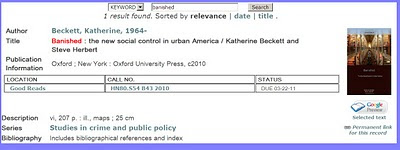
(2) Click on the Permanent Link link on the right:
(3) Copy and paste the URL from your browser:

Like this: Banished: The New Social Control in Urban America, http://marian.law.washington.edu/record=b1227880~S0
In WorldCat:
(1) Find the record you want:
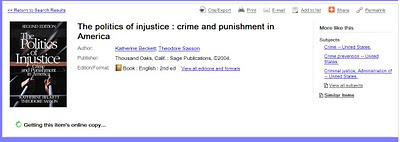
(2) Click on the Permalink link in the upper right corner.

Like this: The Politics of Injustice, http://uwlaw.worldcat.org/oclc/52423857
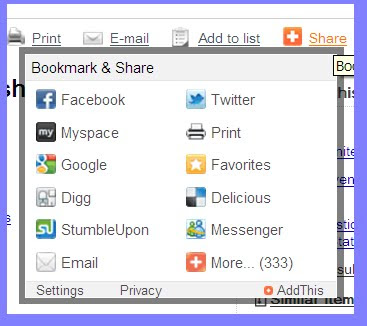
(2) Click the email link:

(3) Fill out the form (your name, recipient's name, email address, message).
Here's how you can provide better links.
In the Law Library Only Catalog:
(1) Find the record you want:

(2) Click on the Permanent Link link on the right:

(3) Copy and paste the URL from your browser:

Like this: Banished: The New Social Control in Urban America, http://marian.law.washington.edu/record=b1227880~S0
In WorldCat:
(1) Find the record you want:

(2) Click on the Permalink link in the upper right corner.

(3) Copy and paste the link that's displayed


Like this: The Politics of Injustice, http://uwlaw.worldcat.org/oclc/52423857
-- OR --
(2) Click the email link:

(3) Fill out the form (your name, recipient's name, email address, message).
-- OR --
(2) Click on the Share link in the upper right corner
(3) Choose your favorite social media tool (Facebook, Twitter, etc.).

~~~~~~~~~~~~~~~~~
Why bother giving the link to the catalog?
It will always give you current information. For instance, Banished is checked out today, but when you or your friend clicks on the catalog link later on -- say, when you're ready to do some unassigned reading over the summer -- you'll see the status.
It will give you complete information. When you're jotting down notes, you might not want to write down the publisher, the year of publication, the authors' full names and so on. Link to the catalog record, and you'll have all that handy whenever you need it.
Why choose WorldCat over the Law Library Only catalog?
It includes other libraries -- a gazillion of them (roughly). If your friend is in New York or Berkeley, he or she can click the record and easily find a local library.
It includes other materials -- for instance journal articles -- so you can link to those citations.
~~~~~~~~~~~~~~~~~~~~
There are a lot more tricks you can do with catalog records -- e.g., exporting them to a bibliographic management system or creating WorldCat lists. We'll write about those tricks another time.
Thursday, October 7, 2010
Gallagher Law Library Toolbar

Looking for quick and convenient access to the Gallagher Law Library catalog (MARIAN) and “quick links” to popular library research pages?
Try adding the Gallagher Law Library toolbar extension to your browser!
When surfing the web, you will also be able to select text on the page and right-click for a menu of search options. The toolbar will also automatically link results from your web searches to the Law Library's print and licensed e-resources.
To install the Firefox extension, click here.
To install the IE plug-in, click here.
Give this a try and let us know what you think. We’d appreciate any comments that you might have. If you need help with installation or if you would like a demo of how to use it, just stop by the Reference Office.
Many thanks to Richard Jost, Information Systems Coordinator at University of Washington Gallagher Law Library, and David Aznar, University of Navarro in Spain, for creating the Gallagher Law Library edition of this LibX toolbar!
Monday, February 1, 2010
Firefox Plugin for Gallagher Catalog
Suppose you're reading an article and it cites a book you'd like to see. You wonder whether your favorite law library has it.

Of course you could open up another tab and run a search in our catalog. But wouldn't it be slick if you could save a step?
Now you can! Thanks to law student David Rubenstein, you can download a Firefox plugin that will put the Gallagher Law Library catalog as close as Google or Wikipedia.
Once you have the plugin, your search window's pull-down menu will include an option for University of Washington Law Library:

And then, wherever you are on the web, you can run a search in our catalog:

And find out that we do indeed have the work cited:

To get this plugin, just go here.
The sample footnote above is from Chelsea Peters, MySpace or Yours? The Impact of the MySpace-Attorneys General Agreement on Online Businesses, 5 Shidler J. L. Com. & Tech. 10 (2008). Have you taken a look at the Shidler Journal lately?

Of course you could open up another tab and run a search in our catalog. But wouldn't it be slick if you could save a step?
Now you can! Thanks to law student David Rubenstein, you can download a Firefox plugin that will put the Gallagher Law Library catalog as close as Google or Wikipedia.
Once you have the plugin, your search window's pull-down menu will include an option for University of Washington Law Library:

And then, wherever you are on the web, you can run a search in our catalog:

And find out that we do indeed have the work cited:

To get this plugin, just go here.
The sample footnote above is from Chelsea Peters, MySpace or Yours? The Impact of the MySpace-Attorneys General Agreement on Online Businesses, 5 Shidler J. L. Com. & Tech. 10 (2008). Have you taken a look at the Shidler Journal lately?
Monday, September 28, 2009
Gallagher's WorldCat Local
This morning, we launched a new catalog service, WorldCat Local. This is in addition to our old catalog:
 You might be familiar with WorldCat Local from the University Libraries, but ours is a little different.
The UW's version ranks material in this order: things held by the University Libraries; things held by Summit libraries (including Gallagher Law Library); things held by libraries anywhere else. Gallagher's version ranks material in this order: things held by Gallagher; things held by Summit libraries (including the University Libraries); things held by 25 top law libraries; things held anywhere else. You can also choose to search which subset of the database to search.
If you search our old catalog, you retrieve just the books, journals, and other materials we have cataloged. For instance, if you look for "war on terror," you get forty-nine records:

In WorldCat Local, the display looks like this:
 And you get over 6,000 records -- quite a bit different, eh?
It's not just books. WorldCat Local includes some article citations, from a few databases. You probably aren't familiar with them (I wasn't), but the two biggies are Article First and British Library Serials. So the same search that got us books also gets us articles:

If you're coming by the library, take a look at the new displays about WorldCat and Summit near the entrance. And watch the Crier and the blog for more information. In the meantime, get in the driver's seat and take WorldCat Local for a little spin.
 You might be familiar with WorldCat Local from the University Libraries, but ours is a little different.
The UW's version ranks material in this order: things held by the University Libraries; things held by Summit libraries (including Gallagher Law Library); things held by libraries anywhere else. Gallagher's version ranks material in this order: things held by Gallagher; things held by Summit libraries (including the University Libraries); things held by 25 top law libraries; things held anywhere else. You can also choose to search which subset of the database to search.
If you search our old catalog, you retrieve just the books, journals, and other materials we have cataloged. For instance, if you look for "war on terror," you get forty-nine records:

In WorldCat Local, the display looks like this:
 And you get over 6,000 records -- quite a bit different, eh?
It's not just books. WorldCat Local includes some article citations, from a few databases. You probably aren't familiar with them (I wasn't), but the two biggies are Article First and British Library Serials. So the same search that got us books also gets us articles:

If you're coming by the library, take a look at the new displays about WorldCat and Summit near the entrance. And watch the Crier and the blog for more information. In the meantime, get in the driver's seat and take WorldCat Local for a little spin.
Subscribe to:
Posts (Atom)